Get ahead
VMware offers training and certification to turbo-charge your progress.
Learn more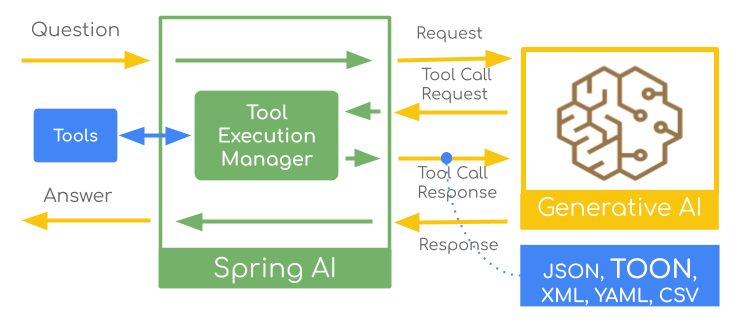
JSON is the go-to format for LLM tool responses, but recent discussions around alternative formats like TOON (Token-Oriented Object Notation) claim potential benefits in token efficiency and performance. While the debate continues—with critical analyses pointing to context-dependent results—the question is: how to experiment with these formats in your own Spring AI applications?
This article demonstrates how to configure Spring AI to convert tool responses between JSON, TOON, XML, CSV, and YAML, enabling you to decide what works best for your specific use case.
Let's briefly review how Spring AI Tool Calling works:
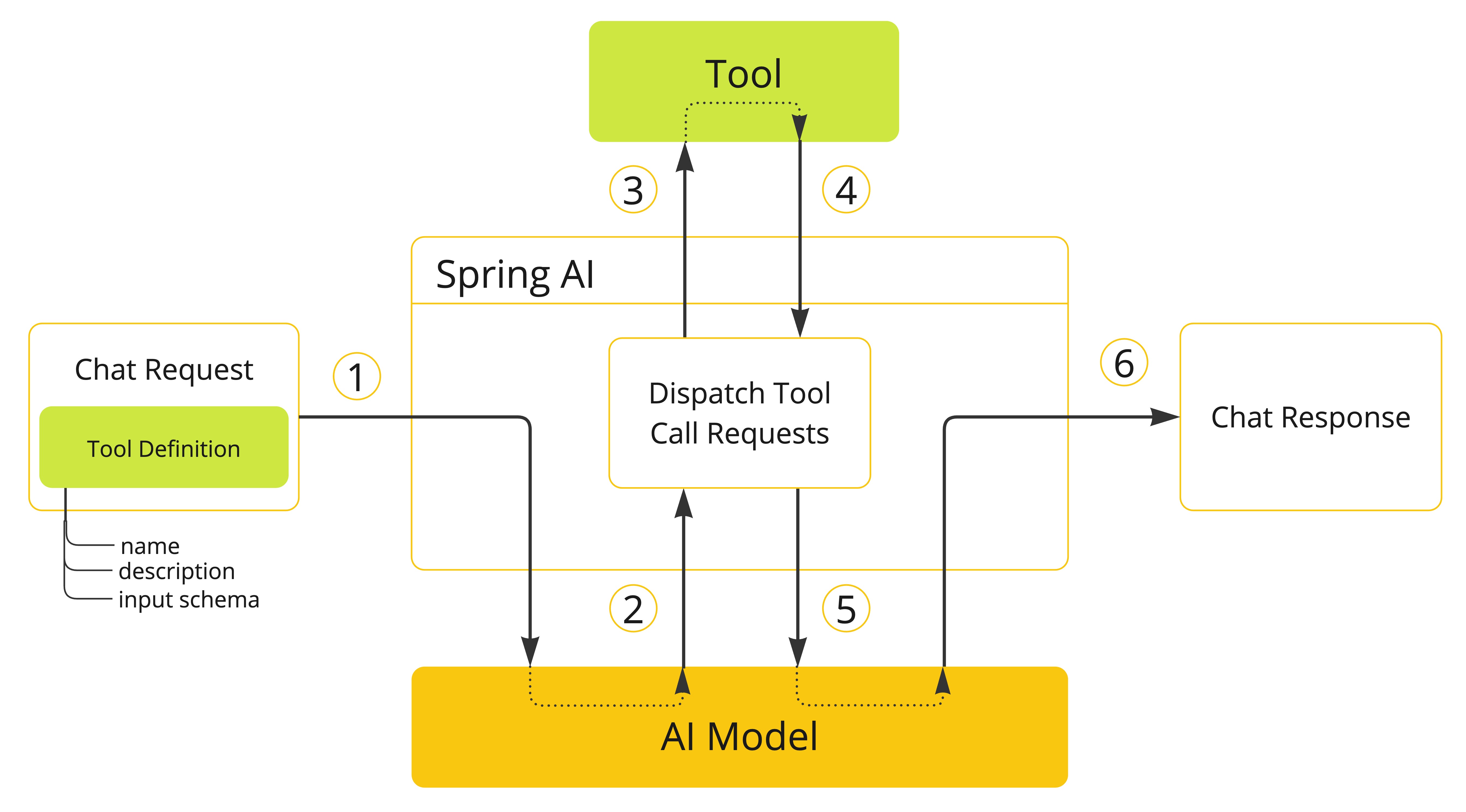
The ToolCallback interface is at the heart of this process. Each tool is wrapped in a ToolCallback that handles the serialization and execution logic.
We can intercept and convert the response format at two key points:
Both approaches have their merits, and the choice depends on your specific requirements. Let's explore each in detail.
Important: Applicable only for local tool implementations such as
@Tool,FunctionToolCallbackandMethodToolCallback. Currently it is not supported by the MCP Tools.
The ToolCallResultConverter interface provides fine-grained control over individual tool formats. The DefaultToolCallResultConverter serializes the result to JSON, but you can customize the serialization process by providing your own ToolCallResultConverter implementation. For example, a custom ToonToolCallResultConverter can look like this:
public static class ToonToolCallResultConverter implements ToolCallResultConverter {

    private ToolCallResultConverter delegate = new DefaultToolCallResultConverter();

    @Override
    public String convert(@Nullable Object result, @Nullable Type returnType) {
        // First convert to JSON using the default converter
        String json = this.delegate.convert(result, returnType);

        // Then convert JSON to TOON
        return JToon.encodeJson(json);
    }
}
It uses the default JSON converter, then converts to TOON using libraries such as JToon or toon4j.
Register with @Tool:
@Tool(description = "Get random titanic passengers",
      resultConverter = ToonToolCallResultConverter.class) // (1)
public List<String> randomTitanicToon(
    @ToolParam(description = "Number of records to return") int count) {
    return TitanicData.getRandomTitanicPassengers(count);
}
Uses the resultConverter attribute to set the custom ToonToolCallResultConverter.
Execution flow: Tool executes → Default converter creates JSON → TOON converter transforms JSON → LLM receives TOON response.
You can also register the ToolCallResultConverter with the FunctionToolCallback and MethodToolCallback builders programmatically.
Limitations:
@McpTool (Model Context Protocol tools)The Application2.java provides an implementation example.
Apply format conversion globally using a custom ToolCallbackProvider that wraps existing providers with delegator pattern:
Original ToolCallbackProvider
    ↓ wrapped by
DelegatorToolCallbackProvider
    ↓ creates wrapped callbacks
DelegatorToolCallback (for each tool)
    ↓ intercepts call() method
    ↓ converts response
JSON → Target Format (TOON/XML/CSV/YAML)
public class DelegatorToolCallbackProvider implements ToolCallbackProvider {
    private final ToolCallbackProvider delegate;
    private final ResponseConverter.Format format;

    public DelegatorToolCallbackProvider(ToolCallbackProvider delegate,
                                         ResponseConverter.Format format) {
        this.delegate = delegate;
        this.format = format;
    }

    @Override
    public ToolCallback[] getToolCallbacks() {
        return Stream.of(this.delegate.getToolCallbacks())
            .map(callback -> new DelegatorToolCallback(callback, this.format))
            .toArray(ToolCallback[]::new);
    }
}
This provider wraps an existing ToolCallbackProvider and creates a DelegatorToolCallback wrapper for each tool callback. The format parameter specifies which format to convert to.
public static class DelegatorToolCallback implements ToolCallback {
    private final ToolCallback delegate;
    private final ResponseConverter.Format format;

    public DelegatorToolCallback(ToolCallback delegate,
                                ResponseConverter.Format format) {
        this.delegate = delegate;
        this.format = format;
    }

    @Override
    public ToolDefinition getToolDefinition() {
        return this.delegate.getToolDefinition();
    }

    @Override
    public String call(String toolInput) {
        // Call the original tool to get JSON response
        String jsonResponse = this.delegate.call(toolInput);
        // Convert to target format
        return ResponseConverter.convert(jsonResponse, this.format);
    }
}
The callback wrapper intercepts the call() method, allowing the original tool to execute normally, then converts its JSON response to the desired format.
public class ResponseConverter {

    public enum Format {
        TOON, YAML, XML, CSV, JSON
    }

    public static String convert(String json, Format format) {
        switch (format) {
            case TOON: return jsonToToon(json);
            case YAML: return jsonToYaml(toJsonNode(json));
            case XML: return jsonToXml(toJsonNode(json));
            case CSV: return jsonToCsv(toJsonNode(json));
            case JSON: return json;
        }
        throw new IllegalStateException("Unsupported format: " + format);
    }

    private static String jsonToToon(String jsonString) {...}
    private static String jsonToYaml(JsonNode jsonNode) {...}
    private static String jsonToXml(JsonNode jsonNode) {...}
    private static String jsonToCsv(JsonNode jsonNode) {...}
}
The ResponseConverter provides conversion methods for each supported format, handling the specific requirements of each (like wrapping arrays for XML or building dynamic schemas for CSV).
Usage example:
@SpringBootApplication
public class Application {

    public static void main(String[] args) {
        SpringApplication.run(Application.class, args);
    }

    @Bean
    CommandLineRunner commandLineRunner(ChatClient.Builder chatClientBuilder,
                                       ToolCallbackProvider toolCallbackProvider) {

        // Wrap the provider with format conversion
        var provider = new DelegatorToolCallbackProvider(
            toolCallbackProvider,
            ResponseConverter.Format.TOON
        );

        // Configure ChatClient with the wrapped provider
        var chatClient = chatClientBuilder
            .defaultToolCallbacks(provider)
            .build();

        return args -> {
            var response = chatClient
                .prompt("Please show me 10 Titanic passengers?")
                .call()
                .chatResponse();

            System.out.println(String.format("""
                RESPONSE: %s
                USAGE: %s
                """,
                response.getResult().getOutput().getText(),
                response.getMetadata().getUsage()));
        };
    }

    @Bean
    MethodToolCallbackProvider methodToolCallbackProvider() {
        return MethodToolCallbackProvider.builder()
            .toolObjects(new MyTools())
            .build();
    }

    static class MyTools {
        @Tool(description = "Get titanic passengers")
        public List<String> randomTitanicToon(
            @ToolParam(description = "Number of records to return") int count) {
            return TitanicData.getTitanicPassengersInRange(30, count);
        }
    }
}
Execution flow: User prompt → LLM calls tool → Wrapper intercepts → Tool executes → JSON created → Format converter transforms → LLM receives converted response.
The Application example leverages the ToolCallAdvisor (e.g. moving the tool execution as part of the Advisor chain) and a custom logging advisor MyLogAdvisor that helps to see the actual tool responses in different formats.
This advisor will print out the tool responses, allowing you to see the target format output.
Let's examine each supported format and see what the output looks like.
[{"PassengerId":"31","Survived":"0","Pclass":"1","Name":"Uruchurtu, Don. Manuel E","Sex":"male","Age":40,"SibSp":"0","Parch":"0","Ticket":"PC 17601","Fare":27.7208,"Cabin":null,"Embarked":"C"},
{"PassengerId":"32","Survived":"1","Pclass":"1","Name":"Spencer, Mrs. William Augustus (Marie Eugenie)","Sex":"female","Age":null,"SibSp":"1","Parch":"0","Ticket":"PC 17569","Fare":146.5208,"Cabin":"B78","Embarked":"C"},
{"PassengerId":"33","Survived":"1","Pclass":"3","Name":"Glynn, Miss. Mary Agatha","Sex":"female","Age":null,"SibSp":"0","Parch":"0","Ticket":"335677","Fare":7.75,"Cabin":null,"Embarked":"Q"},
{"PassengerId":"34","Survived":"0","Pclass":"2","Name":"Wheadon, Mr. Edward H","Sex":"male","Age":66,"SibSp":"0","Parch":"0","Ticket":"C.A. 24579","Fare":10.5,"Cabin":null,"Embarked":"S"},
{"PassengerId":"35","Survived":"0","Pclass":"1","Name":"Meyer, Mr. Edgar Joseph","Sex":"male","Age":28,"SibSp":"1","Parch":"0","Ticket":"PC 17604","Fare":82.1708,"Cabin":null,"Embarked":"C"}]
[5]{PassengerId,Survived,Pclass,Name,Sex,Age,SibSp,Parch,Ticket,Fare,Cabin,Embarked}:
  "31","0","1","Uruchurtu, Don. Manuel E",male,40,"0","0",PC 17601,27.7208,null,C
  "32","1","1","Spencer, Mrs. William Augustus (Marie Eugenie)",female,null,"1","0",PC 17569,146.5208,B78,C
  "33","1","3","Glynn, Miss. Mary Agatha",female,null,"0","0","335677",7.75,null,Q
  "34","0","2","Wheadon, Mr. Edward H",male,66,"0","0",C.A. 24579,10.5,null,S
  "35","0","1","Meyer, Mr. Edgar Joseph",male,28,"1","0",PC 17604,82.1708,null,C
<ObjectNode>
<root><PassengerId>31</PassengerId><Survived>0</Survived><Pclass>1</Pclass><Name>Uruchurtu, Don. Manuel E</Name><Sex>male</Sex><Age>40</Age><SibSp>0</SibSp><Parch>0</Parch><Ticket>PC 17601</Ticket><Fare>27.7208</Fare><Cabin/><Embarked>C</Embarked></root>
<root><PassengerId>32</PassengerId><Survived>1</Survived><Pclass>1</Pclass><Name>Spencer, Mrs. William Augustus (Marie Eugenie)</Name><Sex>female</Sex><Age/><SibSp>1</SibSp><Parch>0</Parch><Ticket>PC 17569</Ticket><Fare>146.5208</Fare><Cabin>B78</Cabin><Embarked>C</Embarked></root>
<root><PassengerId>33</PassengerId><Survived>1</Survived><Pclass>3</Pclass><Name>Glynn, Miss. Mary Agatha</Name><Sex>female</Sex><Age/><SibSp>0</SibSp><Parch>0</Parch><Ticket>335677</Ticket><Fare>7.75</Fare><Cabin/><Embarked>Q</Embarked></root>
<root><PassengerId>34</PassengerId><Survived>0</Survived><Pclass>2</Pclass><Name>Wheadon, Mr. Edward H</Name><Sex>male</Sex><Age>66</Age><SibSp>0</SibSp><Parch>0</Parch><Ticket>C.A. 24579</Ticket><Fare>10.5</Fare><Cabin/><Embarked>S</Embarked></root>
<root><PassengerId>35</PassengerId><Survived>0</Survived><Pclass>1</Pclass><Name>Meyer, Mr. Edgar Joseph</Name><Sex>male</Sex><Age>28</Age><SibSp>1</SibSp><Parch>0</Parch><Ticket>PC 17604</Ticket><Fare>82.1708</Fare><Cabin/><Embarked>C</Embarked></root>
</ObjectNode>
---
- PassengerId: "31"
  Survived: "0"
  Pclass: "1"
  Name: "Uruchurtu, Don. Manuel E"
  Sex: "male"
  Age: 40
  SibSp: "0"
  Parch: "0"
  Ticket: "PC 17601"
  Fare: 27.7208
  Cabin: null
  Embarked: "C"
...
- PassengerId: "35"
  Survived: "0"
  Pclass: "1"
  Name: "Meyer, Mr. Edgar Joseph"
  Sex: "male"
  Age: 28
  SibSp: "1"
  Parch: "0"
  Ticket: "PC 17604"
  Fare: 82.1708
  Cabin: null
  Embarked: "C"
PassengerId,Survived,Pclass,Name,Sex,Age,SibSp,Parch,Ticket,Fare,Cabin,Embarked
31,0,1,"Uruchurtu, Don. Manuel E",male,40,0,0,"PC 17601",27.7208,,C
32,1,1,"Spencer, Mrs. William Augustus (Marie Eugenie)",female,,1,0,"PC 17569",146.5208,B78,C
33,1,3,"Glynn, Miss. Mary Agatha",female,,0,0,335677,7.75,,Q
34,0,2,"Wheadon, Mr. Edward H",male,66,0,0,"C.A. 24579",10.5,,S
35,0,1,"Meyer, Mr. Edgar Joseph",male,28,1,0,"PC 17604",82.1708,,C
Here is the tokens usage estimates per each format
| Format | Prompt Tokens | Completion Tokens | Total Tokens |
|---|---|---|---|
| CSV | 293 | 522 | 815 |
| TOON | 308 | 538 | 846 |
| JSON | 447 | 545 | 992 |
| YAML | 548 | 380 | 928 |
| XML | 599 | 572 | 1171 |
Spring AI offers flexibility for experimenting with tool response formats through two distinct approaches. Use ToolCallResultConverter for selective, per-tool conversion when you need fine-grained control. Choose the global DelegatorToolCallbackProvider approach for consistent format conversion across all tools, including MCP tools. Both support multiple formats—TOON, YAML, XML, CSV, and JSON—giving you the freedom to optimize for your specific use case.
Note: The following code is for demonstration purposes only and should not be used in production without proper testing, error handling, and security considerations.
The complete demo is available on GitHub. Run it with different formats:
./mvnw spring-boot:run -Dspring.ai.tool.response.format=TOON
./mvnw spring-boot:run -Dspring.ai.tool.response.format=CSV
./mvnw spring-boot:run -Dspring.ai.tool.response.format=YAML
Experiment with the formats and measure their impact in your specific environment to determine what works best for your use case.

VMware offers training and certification to turbo-charge your progress.
Learn moreTanzu Spring offers support and binaries for OpenJDK™, Spring, and Apache Tomcat® in one simple subscription.
Learn moreCheck out all the upcoming events in the Spring community.
View all