Get ahead
VMware offers training and certification to turbo-charge your progress.
Learn moreAs AI agents connect to more services—Slack, GitHub, Jira, MCP servers—tool libraries grow rapidly. A typical multi-server setup can easily have 50+ tools consuming 55,000+ tokens before any conversation starts. Worse, tool selection accuracy degrades when models face 30+ similarly-named tools.
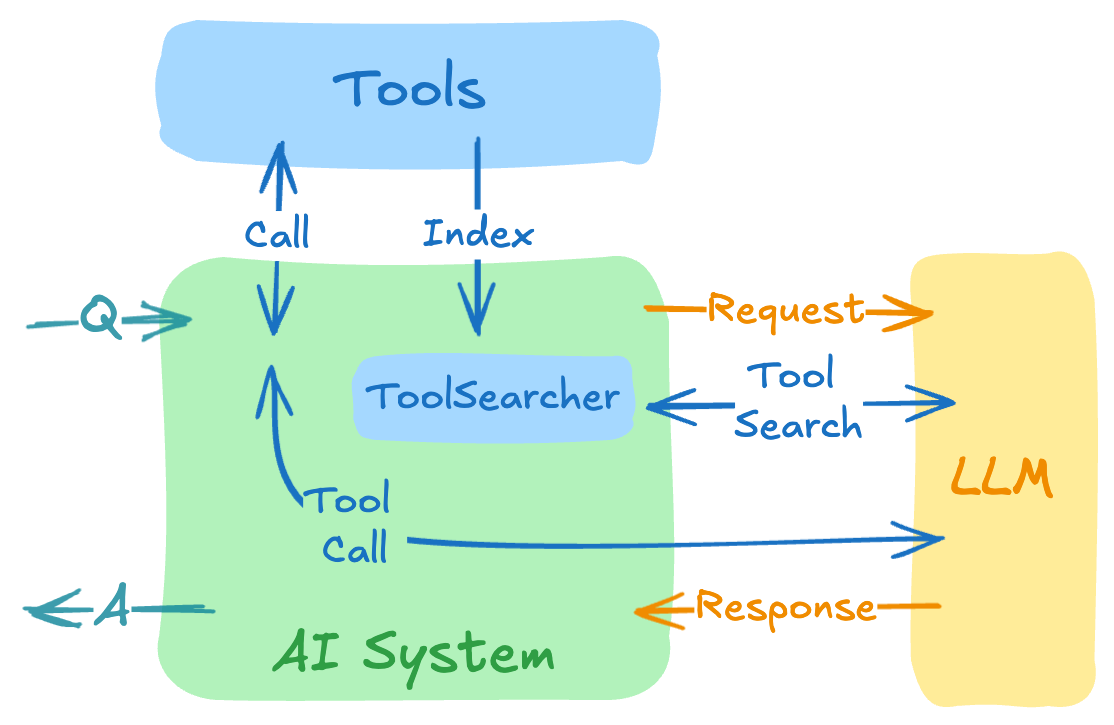
The Tool Search Tool pattern, pioneered by Anthropic, addresses this: instead of loading all tool definitions upfront, the model discovers tools on-demand. It receives only a search tool initially, queries for capabilities when needed, and gets relevant tool definitions expanded into context. This achieves significant token savings while maintaining access to hundreds of tools.
The key insight: While Anthropic introduced this pattern for Claude, we can implement the same approach for any LLM using Spring AI's Recursive Advisors. Spring AI provides a portable abstraction that makes dynamic tool discovery work across OpenAI, Anthropic, Gemini, Ollama, Azure OpenAI, and any other LLM provider supported by Spring AI.
Our preliminary benchmarks show Spring AI's Tool Search Tool implementation achieves 34-64% token reduction across OpenAI, Anthropic, and Gemini models while maintaining full access to hundreds of tools.
Update (Spring AI 2.0.0 GA): The Tool Search Tool has been promoted from the Spring AI Community into the core Spring AI project. The API has been updated to align with Spring AI 2.0.0 conventions — see the Getting Started section for the new Maven coordinates and usage.
First, let's understand how Spring AI's tool calling works when using the ToolCallingAdvisor - a special recursive advisor that:
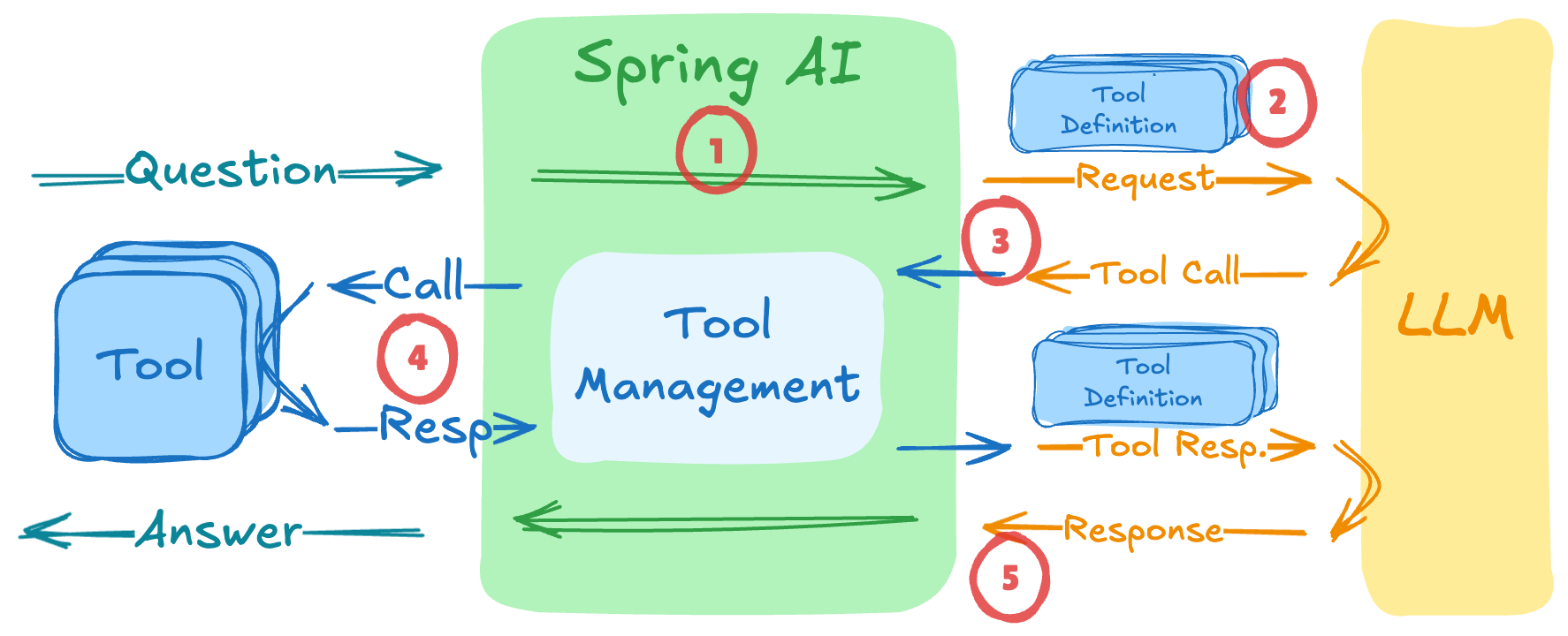
ToolCallingManagerThe tool execution happens in a recursive loop - the advisor keeps calling the LLM until no more tool calls are requested.
The standard tool calling flow (such as ToolCallingAdvisor) sends all tool definitions to the LLM upfront. This creates three major issues with large tool collections:
By extending Spring AI's ToolCallingAdvisor, we've created a ToolSearchToolCallingAdvisor that implements dynamic tool discovery. It intercepts the tool calling loop to selectively inject tools based on what the model discovers it needs:
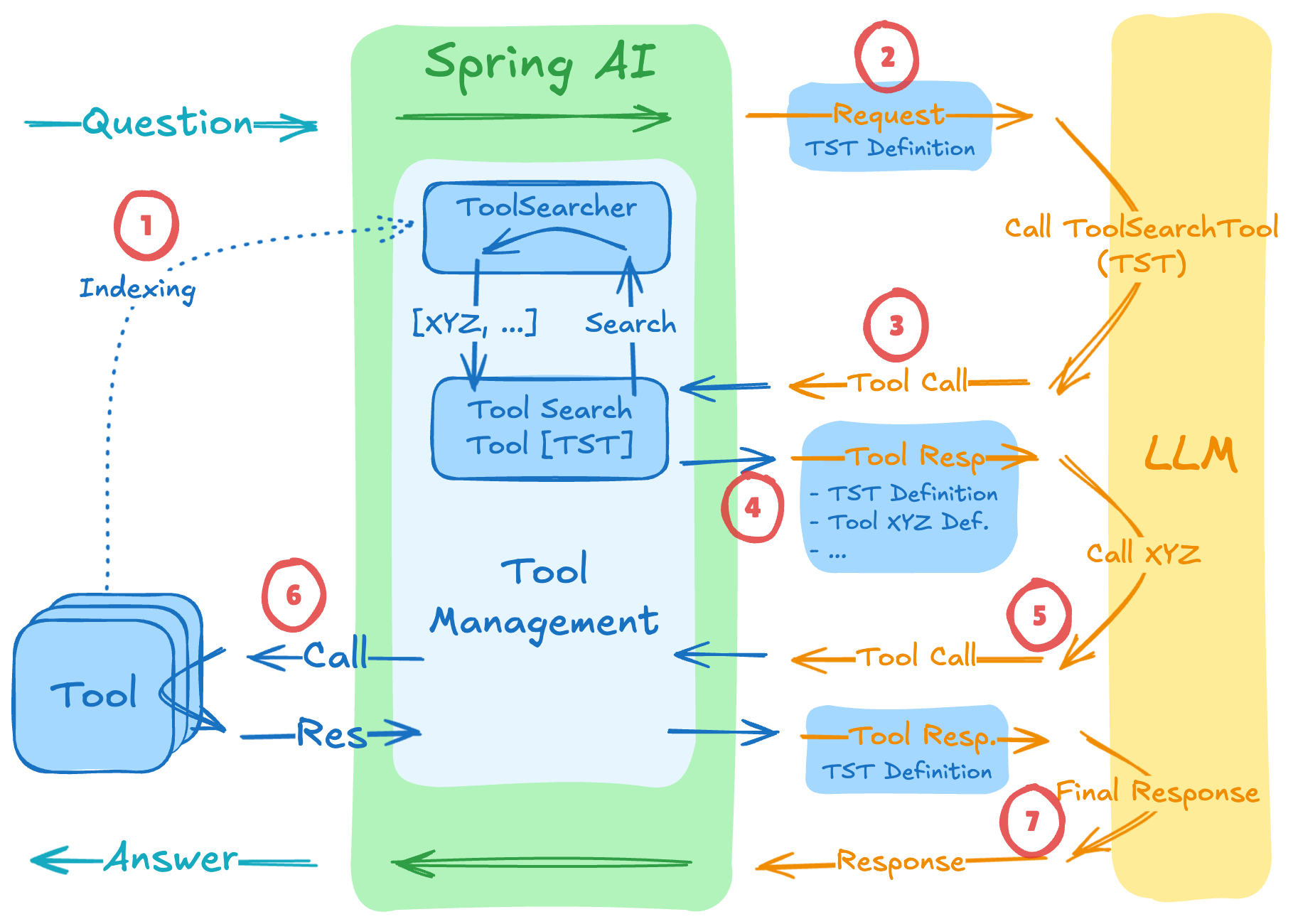
The flow works as follows:
ToolIndex (but NOT sent to the LLM)ToolIndex finds matching tools (e.g., "Tool XYZ") and their definitions are added to the next requestIn code, this looks like this:
var toolSearchAdvisor = ToolSearchToolCallingAdvisor.builder()
    .toolIndex(new LuceneToolIndex())
    .maxResults(5)
    .build();

ChatClient chatClient = chatClientBuilder
    .defaultTools(new MyTools())  // 100s of tools registered but NOT sent to LLM initially
    .defaultAdvisors(toolSearchAdvisor) // Activate Tool Search Tool
    .build();
The ToolIndex interface abstracts the search implementation, supporting multiple strategies:
| Strategy | Implementation | Best For |
|---|---|---|
| Semantic | VectorToolIndex |
Natural language queries, fuzzy matching |
| Keyword | LuceneToolIndex |
Exact term matching, known tool names |
| Regex | RegexToolIndex |
Tool name patterns (get_*_data) |
The Tool Search Tool is now part of the core Spring AI project. The easiest way to get started is the Spring Boot starter, which auto-configures everything from a single property.
The community v1.0.x release remains available for Spring AI 1.1.x / Spring Boot 3 compatibility.
Add the Spring Boot starter, which bundles the advisor, the ToolIndex API, and Apache Lucene:
<dependency>
    <groupId>org.springframework.ai</groupId>
    <artifactId>spring-ai-starter-tool-search-advisor</artifactId>
</dependency>
Then enable dynamic tool discovery with a single property:
spring.ai.chat.client.tool-search-advisor.enabled=true
That's it. The auto-configuration replaces the default ToolCallingAdvisor with ToolSearchToolCallingAdvisor and registers a RegexToolIndex by default. No code changes are needed — your existing ChatClient usages will automatically benefit from dynamic tool discovery.
The tool-index-type property selects the search strategy: regex (default, no extra dependencies), lucene (bundled in the starter), or vector (requires a VectorStore bean). A custom ToolIndex bean always takes precedence over the auto-configured one.
For the full list of configuration properties see the Spring Boot Auto Configuration reference documentation.
If you prefer explicit wiring, add the two individual modules and construct the advisor programmatically:
<!-- Tool Search advisor -->
<dependency>
    <groupId>org.springframework.ai</groupId>
    <artifactId>spring-ai-tool-search-advisor</artifactId>
</dependency>

<!-- Tool Index API + implementations (Lucene, Vector, Regex) -->
<dependency>
    <groupId>org.springframework.ai</groupId>
    <artifactId>spring-ai-tool-search-tool</artifactId>
</dependency>
Example Usage
@SpringBootApplication
public class Application {

    @Bean
    CommandLineRunner demo(ChatClient.Builder builder) {
        return args -> {
            var advisor = ToolSearchToolCallingAdvisor.builder()
                .toolIndex(new LuceneToolIndex())
                .build();

            ChatClient chatClient = builder
                .defaultTools(new MyTools())
                .defaultAdvisors(advisor)
                .build();

            var answer = chatClient.prompt("""
                Help me plan what to wear today in Amsterdam.
                Please suggest clothing shops that are open right now.
                """)
                .advisors(a -> a.param(ChatMemory.CONVERSATION_ID, "my-session-id"))
                .call().content();

            System.out.println(answer);
        };
    }

    static class MyTools {

		@Tool(description = "Get the weather for a given location at a given time")
		public String weather(String location,
            @ToolParam(description = "YYYY-MM-DDTHH:mm") String atTime) {...}

		@Tool(description = "Get clothing shop names for a given location at a given time")
		public List<String> clothing(String location,
				@ToolParam(description = "YYYY-MM-DDTHH:mm") String openAtTime) {...}

		@Tool(description = "Current date and time for a given location")
		public String currentTime(String location) {...}

        // ... potentially hundreds more tools
    }
}
Note: The
ToolSearchToolCallingAdvisorrequires a conversation ID in the advisor params context viaChatMemory.CONVERSATION_ID. This scopes the tool index per session, enabling multi-tenant and multi-turn conversation support. When using the auto-configuration, the session ID key is configurable viaspring.ai.chat.client.tool-search-advisor.session-id-key-name.
For the example above, the flow would be:
weather, clothing, currentTime (+ potentially 100s more)toolSearchTool
toolSearchTool(query="current time date") → ["currentTime"]toolSearchTool + currentTime
currentTime("Amsterdam") → "2025-12-08T11:30"toolSearchTool(query="weather location") → ["weather"]toolSearchTool + currentTime + weather
weather("Amsterdam") → "Sunny, 15°C"toolSearchTool(query="clothing shops") → ["clothing"]toolSearchTool + currentTime + weather + clothing
clothing("Amsterdam", "2025-12-08T11:30") → ["H&M", "Zara", "Uniqlo"]⚠️ Disclaimer: These are preliminary, manual measurements taken after a few runs. They are not averaged across multiple iterations and should be considered illustrative rather than representative.
To quantify the token savings, we ran preliminary benchmarks using the demo application with the following setup:
Task: "Help me plan what to wear today in Amsterdam. Please suggest clothing shops that are open right now."
28 total tools: 3 relevant tools (weather, clothing, currentTime) + 25 unrelated "dummy" tools, deliberately not relevant to the weather/clothing task, demonstrating how the tool search efficiently discovers only the needed tools among many unrelated options.
Search strategies: Lucene (keyword-based) and VectorStore (semantic)
Models tested: Gemini (gemini-3-pro-preview), OpenAI (gpt-5-mini-2025-08-07), Anthropic (claude-sonnet-4-5-20250929)
The measurements are collected using a custom TokenCounterAdvisor that tracks and aggregates the token usage.
| Model | Approach | Total Tokens | Prompt Tokens | Completion Tokens | Requests | Savings |
|---|---|---|---|---|---|---|
| Gemini | With TST | 2,165 | 1,412 | 231 | 4 | 60% |
| Without TST | 5,375 | 4,800 | 176 | 3 | — | |
| OpenAI | With TST | 4,706 | 2,770 | 1,936 | 5 | 34% |
| Without TST | 7,175 | 5,765 | 1,410 | 3 | — | |
| Anthropic | With TST | 6,273 | 5,638 | 635 | 5 | 64% |
| Without TST | 17,342 | 16,752 | 590 | 4 | — |
| Model | Approach | Total Tokens | Prompt Tokens | Completion Tokens | Requests | Savings |
|---|---|---|---|---|---|---|
| Gemini | With TST | 2,214 | 1,502 | 234 | 4 | 57% |
| Without TST | 5,122 | 4,767 | 73 | 3 | — | |
| OpenAI | With TST | 3,697 | 2,109 | 1,588 | 4 | 47% |
| Without TST | 6,959 | 5,771 | 1,188 | 3 | — | |
| Anthropic | With TST | 6,319 | 5,642 | 677 | 5 | 63% |
| Without TST | 17,291 | 16,744 | 547 | 4 | — |
currentTime before invoking the other tools, demonstrating correct reasoning about tool dependencies.systemMessageSuffix to provide additional guidance to the model, experiment with different ToolIndex configurations or pair this approach with the LLM as Judge pattern to ensure reliable and consistent behavior across different models.| Tool Search Tool Approach | Traditional Approach |
|---|---|
| 20+ tools in your system | Small tool library (<20 tools) |
| Tool definitions consuming >5K tokens | All tools frequently used in every session |
| Building MCP-powered systems with multiple servers | Very compact tool definitions |
| Experiencing tool selection accuracy issues |
As part of Spring AI 2.0.0, the Tool Search Tool is now a first-class feature of the core Spring AI project. You can find the source in the spring-projects/spring-ai repository.
Also, you can consider combining the Tool Search Tool with LLM-as-a-Judge patterns to ensure discovered tools actually fulfill the user's task. A judge model could evaluate whether the dynamically selected tools produced satisfactory results and improve the tool discovery if needed.
The Tool Search Tool pattern is a step toward scalable AI agents. By combining Anthropic's innovative approach with Spring AI's portable abstraction, we can build systems that efficiently manage thousands of tools while maintaining high accuracy across any LLM provider.
The power of Spring AI's recursive advisor architecture is that it allows us to implement sophisticated tool discovery workflows that work universally - whether you're using OpenAI's GPT models, Anthropic's Claude, local Ollama models, or any other LLM supported by Spring AI. You get the same dynamic tool discovery benefits without being locked into a specific provider's native implementation.

VMware offers training and certification to turbo-charge your progress.
Learn moreTanzu Spring offers support and binaries for OpenJDK™, Spring, and Apache Tomcat® in one simple subscription.
Learn moreCheck out all the upcoming events in the Spring community.
View all